> ## Documentation Index
> Fetch the complete documentation index at: https://docs.akapulu.com/llms.txt
> Use this file to discover all available pages before exploring further.
# Templates and Variables
> Use runtime, LLM, and secret variables in endpoint templates.
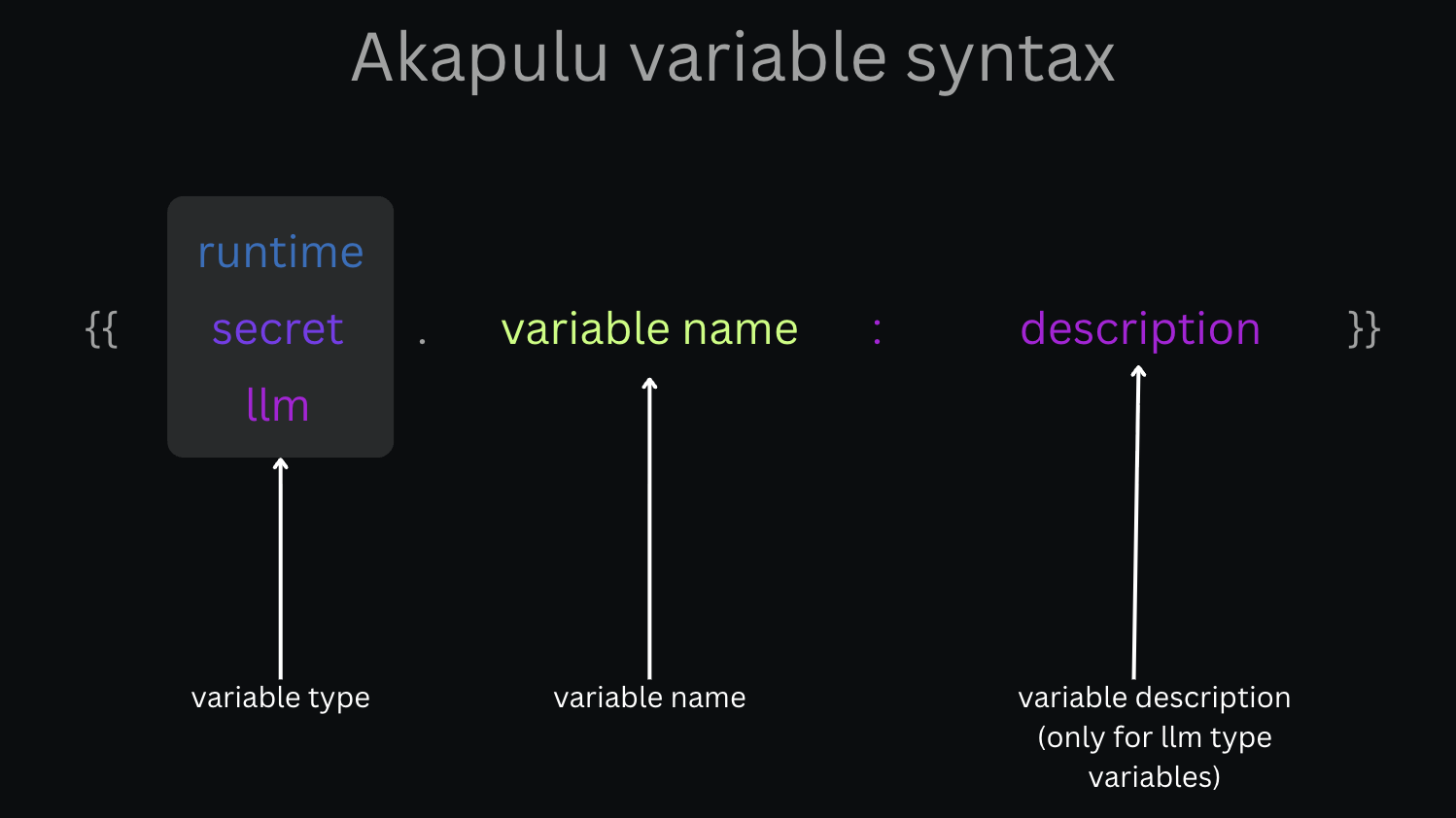 You can use template variables in both `headers` and `body` for HTTP endpoints.
Template format:
```text theme={null}
{{var_type.var_name}}
```
For LLM variables, include a description:
```text theme={null}
{{llm.var_name:description}}
```
You can use template variables in both `headers` and `body` for HTTP endpoints.
Template format:
```text theme={null}
{{var_type.var_name}}
```
For LLM variables, include a description:
```text theme={null}
{{llm.var_name:description}}
```
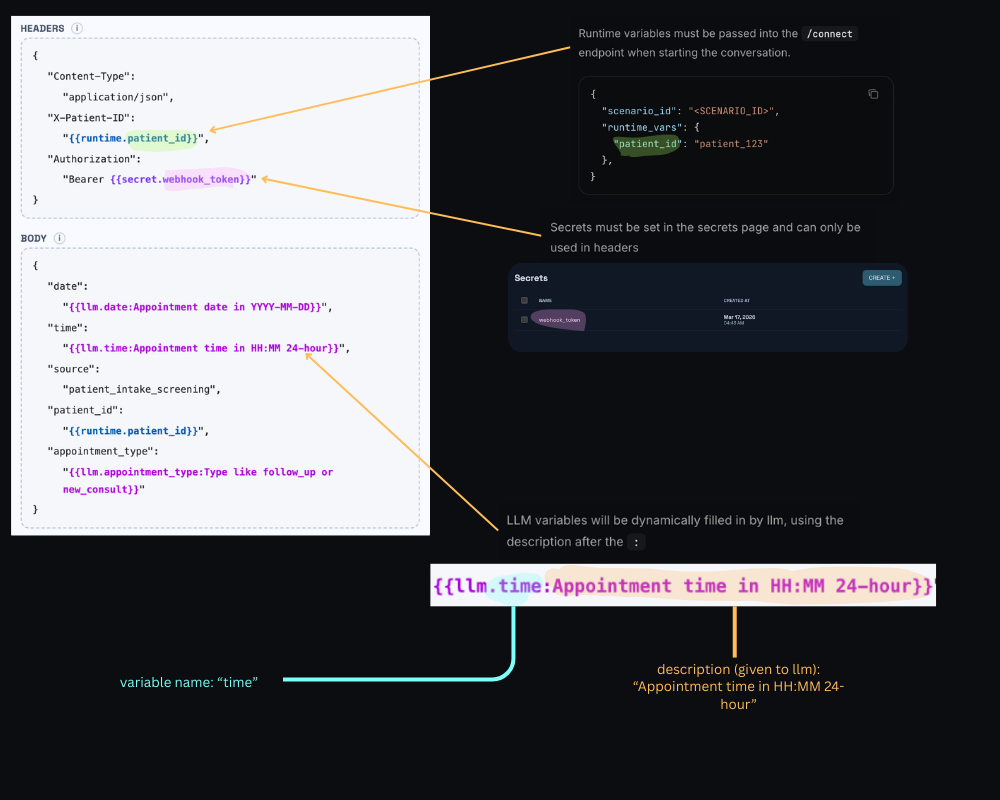 ## Secret variables
Syntax:
```text theme={null}
{{secret.var_name}}
```
Use this for sensitive values such as API keys, tokens, and tenant secrets.
`secret` variables must be created in [akapulu.com/secrets](https://akapulu.com/secrets).
Secret variables are allowed only in endpoint headers. Secret variables are not allowed in request body fields, `role_instruction`, or `task_instruction`. `role_instruction`, `task_instruction`, and HTTP endpoint request bodies may be visible to users, so they should not contain sensitive information.
Examples:
```json theme={null}
{
"headers": {
"Authorization": "Bearer {{secret.crm_api_key}}",
"X-Tenant-Token": "{{secret.tenant_token}}"
},
"body": {
"source": "akapulu_assistant"
}
}
```
## Runtime variables
Syntax:
```text theme={null}
{{runtime.var_name}}
```
Use this for per-session values that your app passes at connect time (for example user IDs, session IDs, org IDs).
`runtime` variables must be passed to the [connect endpoint](/api-reference/conversations/connect) as `runtime_vars`.
**Web SDK:** If using the [Akapulu Labs Web SDK](/web-sdk/overview), from your backend connect route, call **`akapulu.connectConversation`** from **`@akapulu/server`** and pass **`runtime_vars`** with the same keys you use in **`{{runtime.*}}`** templates. See [Customize Conversation UI](/guides/conversations/customize-conversation-ui) for a full connect-route example.
Examples:
```json theme={null}
{
"headers": {
"X-Session-ID": "{{runtime.session_id}}"
},
"body": {
"patient_id": "{{runtime.patient_id}}",
"workspace_id": "{{runtime.workspace_id}}"
}
}
```
### In `role_instruction` and `task_instruction`
You can use the same `{{runtime.*}}` placeholders in the scenario’s global **`role_instruction`** and each node’s **`task_instruction`**. They are expanded from **`runtime_vars` at connect time**, so the model sees the resolved text for that session (unlike `{{llm.*}}`, which only resolves when a function tool runs).
Example (fragment; your scenario also needs the usual `nodes` / routing fields):
```json theme={null}
{
"role_instruction": "You are an onboarding specialist for {{runtime.company_name}}. The user’s account id is {{runtime.user_id}}; keep the flow relevant to their workspace.",
"nodes": [
{
"name": "verify_identity",
"task_instruction": "Confirm you are helping {{runtime.preferred_name}} (patient record {{runtime.patient_id}}) before discussing results. If they correct their name, follow their lead."
}
]
}
```
Your app must pass matching keys (`company_name`, `user_id`, `preferred_name`, `patient_id`, etc.) in `runtime_vars` on [connect](/api-reference/conversations/connect).
## LLM variables
Syntax:
```text theme={null}
{{llm.var_name:description}}
```
Use this for dynamic values the model should fill at tool-call time.
The description is shown to the model as part of normal tool-call parameter guidance, so write it clearly and specifically.
Examples:
```json theme={null}
{
"body": {
"date": "{{llm.date:Appointment date in YYYY-MM-DD format}}",
"time": "{{llm.time:Appointment time in HH:MM 24-hour format}}",
"reason": "{{llm.reason:Short reason for visit from user request}}"
}
}
```
## Function tools
`{{llm.*}}` placeholders work in **HTTP endpoint** templates (for example headers and body) when that endpoint is attached as a **function tool**: the model supplies values only when it **invokes** the tool, and those values are merged into the outgoing request.
**`{{llm.*}}` is not supported in `role_instruction` or `task_instruction`.** Those strings are fixed prompt text for the node (with only the other variable types applied, such as `runtime.*`). The model does not “call” them like a tool, so there is no tool-call step where it could fill LLM parameters.
## Mixed example
Below, a booking flow uses **runtime** substitutions in `role_instruction` and `task_instruction`, plus one HTTP endpoint (attached as a function tool) that mixes **secret**, **runtime**, and **llm** template variables.
| Source | Variables in this example |
| ------------------------------------------------------------------------------------------------------ | ----------------------------------------------------------------------- |
| **[Connect](/api-reference/conversations/connect) `runtime_vars`** (your server supplies each session) | `session_id`, `user_id`, `company_name`, `preferred_name`, `patient_id` |
| **[Secrets](https://akapulu.com/secrets)** (create once per project; referenced as `{{secret.*}}`) | `crm_api_key` |
| **Model at tool-call time** (`{{llm.*}}` in the endpoint body only) | `date`, `time` |
### Scenario: `role_instruction` and `task_instruction`
Fragment showing runtime templates in prompts (your full scenario also needs routing, tools, and so on):
```json theme={null}
{
"role_instruction": "You are a scheduling assistant for {{runtime.company_name}}. The signed-in account is {{runtime.user_id}}.",
"nodes": [
{
"name": "booking",
"task_instruction": "Help {{runtime.preferred_name}} book a visit. Their patient id suffix is {{runtime.patient_id}}. When you have a concrete date and time from the user, call the book_appointment tool."
}
]
}
```
Omitted here: `functions`, edges, and other required scenario fields—in your real JSON, attach the HTTP function tool that uses the endpoint template below.
### HTTP endpoint template (function tool)
```json theme={null}
{
"headers": {
"Authorization": "Bearer {{secret.crm_api_key}}",
"X-Session-ID": "{{runtime.session_id}}"
},
"body": {
"patient_id": "patient_{{runtime.patient_id}}",
"appointment_date": "{{llm.date:Appointment date in YYYY-MM-DD format}}",
"appointment_time": "{{llm.time:Appointment time in HH:MM 24-hour format}}"
}
}
```
### Connect payload (where runtime values come from)
Your backend passes the same keys used in `{{runtime.*}}` above:
```json theme={null}
{
"scenario_id": "YOUR_SCENARIO_ID",
"avatar_id": "YOUR_AVATAR_ID",
"runtime_vars": {
"session_id": "sess_9f2a1c",
"user_id": "usr_001",
"company_name": "Acme Health",
"preferred_name": "Jordan",
"patient_id": "2938573456"
}
}
```
After connect, instructions show the substituted text, and the endpoint template is ready except for `{{llm.*}}`, which resolve when the model invokes the tool.
### Example HTTP request (after secret + runtime substitution and a tool call)
Akapulu Labs issues this as an **HTTP POST** to your endpoint URL. `Authorization` and `patient_id` / session header came from secrets + runtime. `appointment_date` and `appointment_time` are whatever the model supplied for `date` and `time` on that call.
```json theme={null}
{
"headers": {
"Authorization": "Bearer sk_live_abc123",
"X-Session-ID": "sess_9f2a1c"
},
"body": {
"patient_id": "patient_2938573456",
"appointment_date": "2026-03-18",
"appointment_time": "14:00"
}
}
```
## Secret variables
Syntax:
```text theme={null}
{{secret.var_name}}
```
Use this for sensitive values such as API keys, tokens, and tenant secrets.
`secret` variables must be created in [akapulu.com/secrets](https://akapulu.com/secrets).
Secret variables are allowed only in endpoint headers. Secret variables are not allowed in request body fields, `role_instruction`, or `task_instruction`. `role_instruction`, `task_instruction`, and HTTP endpoint request bodies may be visible to users, so they should not contain sensitive information.
Examples:
```json theme={null}
{
"headers": {
"Authorization": "Bearer {{secret.crm_api_key}}",
"X-Tenant-Token": "{{secret.tenant_token}}"
},
"body": {
"source": "akapulu_assistant"
}
}
```
## Runtime variables
Syntax:
```text theme={null}
{{runtime.var_name}}
```
Use this for per-session values that your app passes at connect time (for example user IDs, session IDs, org IDs).
`runtime` variables must be passed to the [connect endpoint](/api-reference/conversations/connect) as `runtime_vars`.
**Web SDK:** If using the [Akapulu Labs Web SDK](/web-sdk/overview), from your backend connect route, call **`akapulu.connectConversation`** from **`@akapulu/server`** and pass **`runtime_vars`** with the same keys you use in **`{{runtime.*}}`** templates. See [Customize Conversation UI](/guides/conversations/customize-conversation-ui) for a full connect-route example.
Examples:
```json theme={null}
{
"headers": {
"X-Session-ID": "{{runtime.session_id}}"
},
"body": {
"patient_id": "{{runtime.patient_id}}",
"workspace_id": "{{runtime.workspace_id}}"
}
}
```
### In `role_instruction` and `task_instruction`
You can use the same `{{runtime.*}}` placeholders in the scenario’s global **`role_instruction`** and each node’s **`task_instruction`**. They are expanded from **`runtime_vars` at connect time**, so the model sees the resolved text for that session (unlike `{{llm.*}}`, which only resolves when a function tool runs).
Example (fragment; your scenario also needs the usual `nodes` / routing fields):
```json theme={null}
{
"role_instruction": "You are an onboarding specialist for {{runtime.company_name}}. The user’s account id is {{runtime.user_id}}; keep the flow relevant to their workspace.",
"nodes": [
{
"name": "verify_identity",
"task_instruction": "Confirm you are helping {{runtime.preferred_name}} (patient record {{runtime.patient_id}}) before discussing results. If they correct their name, follow their lead."
}
]
}
```
Your app must pass matching keys (`company_name`, `user_id`, `preferred_name`, `patient_id`, etc.) in `runtime_vars` on [connect](/api-reference/conversations/connect).
## LLM variables
Syntax:
```text theme={null}
{{llm.var_name:description}}
```
Use this for dynamic values the model should fill at tool-call time.
The description is shown to the model as part of normal tool-call parameter guidance, so write it clearly and specifically.
Examples:
```json theme={null}
{
"body": {
"date": "{{llm.date:Appointment date in YYYY-MM-DD format}}",
"time": "{{llm.time:Appointment time in HH:MM 24-hour format}}",
"reason": "{{llm.reason:Short reason for visit from user request}}"
}
}
```
## Function tools
`{{llm.*}}` placeholders work in **HTTP endpoint** templates (for example headers and body) when that endpoint is attached as a **function tool**: the model supplies values only when it **invokes** the tool, and those values are merged into the outgoing request.
**`{{llm.*}}` is not supported in `role_instruction` or `task_instruction`.** Those strings are fixed prompt text for the node (with only the other variable types applied, such as `runtime.*`). The model does not “call” them like a tool, so there is no tool-call step where it could fill LLM parameters.
## Mixed example
Below, a booking flow uses **runtime** substitutions in `role_instruction` and `task_instruction`, plus one HTTP endpoint (attached as a function tool) that mixes **secret**, **runtime**, and **llm** template variables.
| Source | Variables in this example |
| ------------------------------------------------------------------------------------------------------ | ----------------------------------------------------------------------- |
| **[Connect](/api-reference/conversations/connect) `runtime_vars`** (your server supplies each session) | `session_id`, `user_id`, `company_name`, `preferred_name`, `patient_id` |
| **[Secrets](https://akapulu.com/secrets)** (create once per project; referenced as `{{secret.*}}`) | `crm_api_key` |
| **Model at tool-call time** (`{{llm.*}}` in the endpoint body only) | `date`, `time` |
### Scenario: `role_instruction` and `task_instruction`
Fragment showing runtime templates in prompts (your full scenario also needs routing, tools, and so on):
```json theme={null}
{
"role_instruction": "You are a scheduling assistant for {{runtime.company_name}}. The signed-in account is {{runtime.user_id}}.",
"nodes": [
{
"name": "booking",
"task_instruction": "Help {{runtime.preferred_name}} book a visit. Their patient id suffix is {{runtime.patient_id}}. When you have a concrete date and time from the user, call the book_appointment tool."
}
]
}
```
Omitted here: `functions`, edges, and other required scenario fields—in your real JSON, attach the HTTP function tool that uses the endpoint template below.
### HTTP endpoint template (function tool)
```json theme={null}
{
"headers": {
"Authorization": "Bearer {{secret.crm_api_key}}",
"X-Session-ID": "{{runtime.session_id}}"
},
"body": {
"patient_id": "patient_{{runtime.patient_id}}",
"appointment_date": "{{llm.date:Appointment date in YYYY-MM-DD format}}",
"appointment_time": "{{llm.time:Appointment time in HH:MM 24-hour format}}"
}
}
```
### Connect payload (where runtime values come from)
Your backend passes the same keys used in `{{runtime.*}}` above:
```json theme={null}
{
"scenario_id": "YOUR_SCENARIO_ID",
"avatar_id": "YOUR_AVATAR_ID",
"runtime_vars": {
"session_id": "sess_9f2a1c",
"user_id": "usr_001",
"company_name": "Acme Health",
"preferred_name": "Jordan",
"patient_id": "2938573456"
}
}
```
After connect, instructions show the substituted text, and the endpoint template is ready except for `{{llm.*}}`, which resolve when the model invokes the tool.
### Example HTTP request (after secret + runtime substitution and a tool call)
Akapulu Labs issues this as an **HTTP POST** to your endpoint URL. `Authorization` and `patient_id` / session header came from secrets + runtime. `appointment_date` and `appointment_time` are whatever the model supplied for `date` and `time` on that call.
```json theme={null}
{
"headers": {
"Authorization": "Bearer sk_live_abc123",
"X-Session-ID": "sess_9f2a1c"
},
"body": {
"patient_id": "patient_2938573456",
"appointment_date": "2026-03-18",
"appointment_time": "14:00"
}
}
```